压缩 CSS
Lighthouse 报告的 Opportunities 部分列出了所有未压缩的 CSS 文件,以及压缩这些文件后可能节省的千字节 (KiB) :
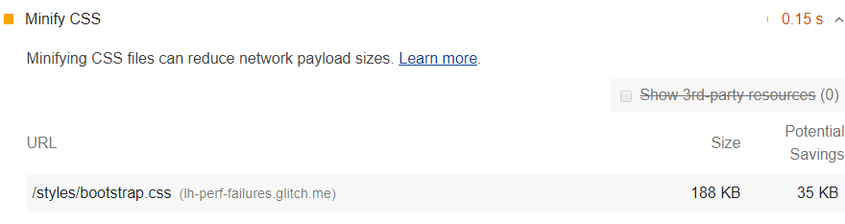
1. 压缩 CSS 文件如何提高性能
压缩 CSS 文件可以提高页面加载性能。CSS 文件通常比它们需要的大。例如:
/* Header background should match brand colors. */
h1 {
  background-color: #000000;
}
h2 {
  background-color: #000000;
}
可以被简化为:
h1, h2 { background-color: #000000; }
从浏览器的角度来看,这两个代码示例在功能上是等效的,但第二个示例使用的字节更少。压缩工具可以通过删除空格进一步提高字节效率:
h1,h2{background-color:#000000;}
有些压缩工具采用巧妙的技巧来最小化字节。例如,颜色值 #000000 可以进一步简化为 #000,这是它的简写等价物。
Lighthouse 根据它在您的 CSS 代码中找到的注释和空白字符,提供潜在节省的估计。这是一个保守的估计。如前所述,压缩工具可以执行更巧妙的优化(例如:把 #000000 改为 #000)以进一步减小文件大小。因此,如果您使用压缩工具,您可能会看到比 Lighthouse 报告的更多节省。
2. 使用 CSS 压缩工具来缩小你的 CSS 代码
对于您不经常更新的小型网站,您可以使用在线服务来手动压缩文件。您将 CSS 粘贴到在线服务的界面中,它会返回代码的压缩版本。
对于专业开发人员,您可能希望设置一个自动化的工作流程,在部署更新的代码之前自动压缩您的 CSS。这通常是通过像 Gulp 或 Webpack 这样的构建工具来完成的。
在 Minify CSS 中了解如何压缩 CSS 代码。
3. Stack-specific guidance
3.1. Drupal
Enable Aggregate CSS files in Administration > Configuration > Development. You can also configure more advanced aggregation options through additional modules to speed up your site by concatenating, minifying, and compressing your CSS styles.
3.2. Joomla
A number of Joomla extensions can speed up your site by concatenating, minifying, and compressing your css styles. There are also templates that provide this functionality.
3.3. Magento
Enable the Minify CSS Files option in your store's Developer settings.
3.4. React
If your build system minifies CSS files automatically, ensure that you are deploying the production build of your application. You can check this with the React Developer Tools extension.
4. WordPress
A number of WordPress plugins can speed up your site by concatenating, minifying, and compressing your styles. You may also want to use a build process to do this minification up-front if possible.